How it works in GetMyMood
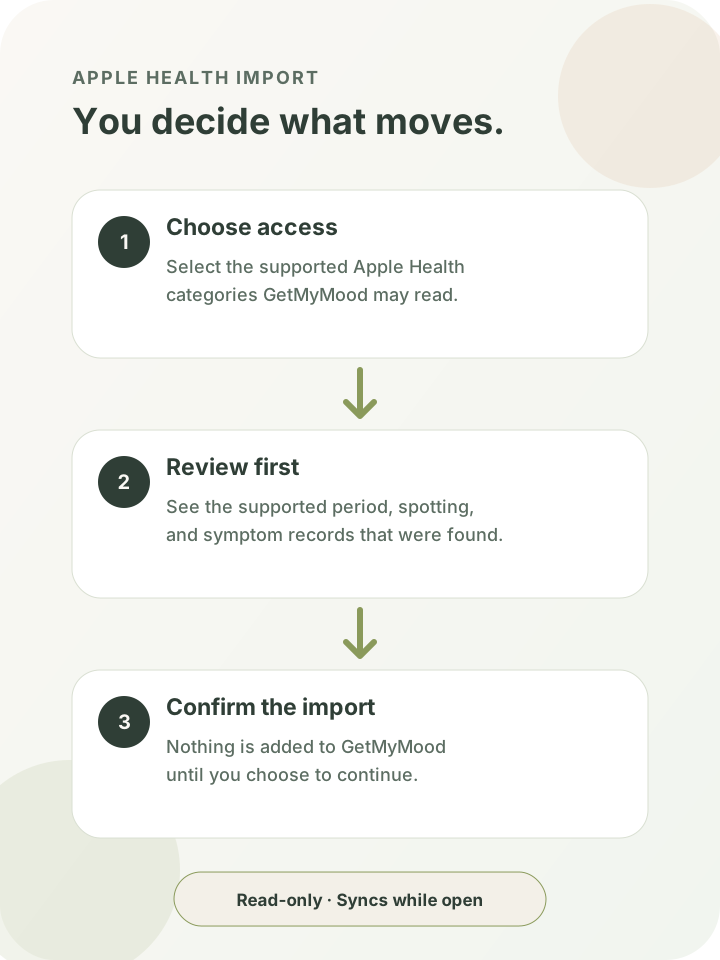
When Apple Health is available for your account, you can open Settings in GetMyMood and choose Apple Health. GetMyMood then asks iOS for permission to read the supported data types you select. Apple keeps those permissions specific, so you remain in control of which categories the app can read.
After permission is resolved, GetMyMood reviews the supported records it can access and shows you a preview. Nothing is imported until you confirm. This gives you a chance to understand what was found before Apple Health history becomes part of your GetMyMood timeline.
Review first. Import only after you confirm.
Connecting Apple Health is not the same as importing. The first step grants read access to the categories you choose. GetMyMood then prepares a review of the supported menstrual-flow, spotting, and symptom records it found. You can leave without confirming, and the review itself does not add those records to GetMyMood.
When you do confirm, the supported records are brought into your account with their Apple Health source recorded. That source information helps GetMyMood distinguish imported history from entries you created in the app.
What can come over from Apple Health
GetMyMood supports menstrual-flow records used for period history, spotting records, and 14 symptom categories: abdominal cramps, bloating, constipation, diarrhea, nausea, headache, pelvic pain, hot flashes, vaginal dryness, night sweats, dry skin, hair loss, acne, and dizziness. It does not read other Apple Health categories and is not a general medical-record connection.
Your existing GetMyMood history is preserved. Imported records do not replace user-created period days or notes, and a manual GetMyMood entry takes priority when imported and user-entered information overlap. That keeps your own corrections and context intact.
Read-only, foreground syncing
The Apple Health connection is read-only. GetMyMood does not write period days, flow, symptoms, or other records back to Apple Health. The integration is designed to bring supported history into GetMyMood, not to export your GetMyMood logs into Apple's Health app.
After the first confirmed import, supported changes can sync when GetMyMood starts, returns to the foreground, or when you choose Sync now. They do not sync continuously in the background. In plain language: supported changes sync only while GetMyMood is open.
Pause, resume, or disconnect
You can pause the connection when you want GetMyMood to stop checking for new supported Apple Health records. Pausing does not erase history that was already imported, and you can resume later from the same Apple Health settings screen.
If you disconnect, GetMyMood lets you keep the imported records or remove them. Choosing removal targets records owned by the Apple Health integration. Period days, symptoms, notes, and other information you entered directly in GetMyMood remain yours and are not removed with the integration's imported data.
Your permission stays under your control
Apple Health requires permission for the health data types an app asks to read. You can change those permissions through iOS, independently of the connection controls inside GetMyMood. If access to a category is not granted, GetMyMood cannot import records from that category.
GetMyMood handles imported records under the same privacy policy that applies to the rest of your account and tracking data. Read the linked Privacy Policy for the complete description of collection, use, storage, deletion, and your available choices.
Look for Apple Health in Settings
On an eligible iPhone, open GetMyMood, go to Settings, and look for Apple Health. From there, choose Connect Apple Health, review the iOS permission request, check the import preview, and confirm only when you are ready.
If Apple Health is not shown, the connection is not currently available for that device, account, app version, or rollout. GetMyMood does not currently offer Android Health Connect import, so this page and connection apply to iPhone only.